Employee monitoring software your team can trust.
SecureGard is UK-hosted productivity tracking that gives managers honest, daily insight into how working hours are spent — without keystroke logging, hidden cameras, or anything that crosses the line.
See SecureGard in action.
The admin console gives you a single, calm view of how the working day is spent — daily totals, app and website breakdown, hourly activity chart, and per-employee timelines.
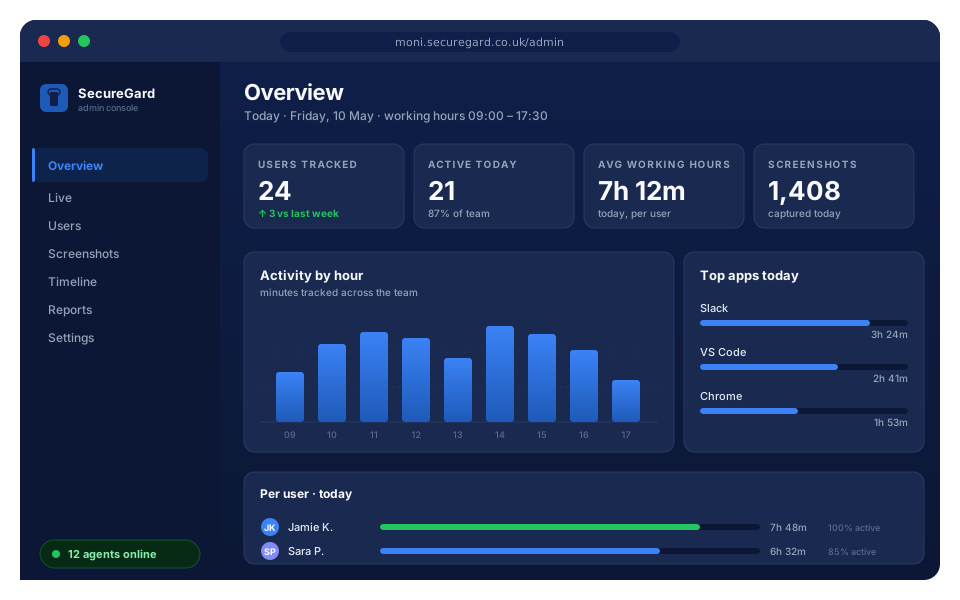
moni.securegard.co.uk/admin — your data, your subdomain, UK infrastructure.Real-time activity
See who's working right now, what app they're using, and how long they've been active — refreshed every few seconds.
Daily & monthly reports
Per-user breakdowns of total time, top apps, and top websites. Export to CSV for payroll and billing.
Working-hours aware
The agent only tracks during the schedule you configure. Personal time outside working hours stays private.
Productivity insights, not surveillance.
Everything a UK manager needs to understand how the working day is spent — nothing that crosses the line into personal life.
Working-hours aware
Tracking auto-pauses outside the configured working hours and on weekends. Personal time stays private.
Daily and monthly reports
Per-employee breakdowns of total time, app usage, and website time. Roll up by week, month, or whole team.
Application and website summary
See where the day actually went — by app, browser tab, and per-domain time. Useful for both managers and individuals.
Periodic screenshots
Optional, configurable interval per employee. Useful for billable-hour evidence and sample auditing — fully disclosed up-front.
Cross-platform agent
Native installers for macOS (Apple Silicon and Intel) and Windows (x64). Runs quietly in the menu bar or system tray.
UK-hosted & self-hosted ready
All customer data lives on UK servers behind your own subdomain. Enterprise customers can opt for fully self-hosted deployments.
Who uses SecureGard.
Designed for UK SMEs and mid-market teams that want clarity on remote work without micromanaging.
Remote and hybrid teams
Get a fair, factual picture of how distributed teams spend the day — without forcing anyone to be on camera or run intrusive software.
Professional services billing
Agencies, consultancies, and law firms that bill by the hour use SecureGard's app and website breakdown to back up timesheets with evidence.
Compliance-heavy industries
Finance, insurance, and healthcare teams use SecureGard's audit trail to evidence policy adherence during external audits.
Managers who care about culture
If you want measurement without surveillance theatre, SecureGard's transparent design and per-employee dashboard help build trust, not anxiety.
Three steps. Done in ten minutes.
SecureGard is intentionally small. There is nothing to integrate, no SDK, no plugin to install in your codebase.
Install the agent
Each employee installs the SecureGard agent on their work laptop. One-click installer for macOS or Windows.
Sign in once
The employee signs in with the account you create for them. The agent runs in the background during working hours.
Read the reports
Open the admin console any time to see daily and monthly reports, top apps, top websites, and time totals per person.
Simple, predictable pricing in pounds.
Start free, upgrade when you outgrow it. Each plan gets its own subdomain and isolated data on UK infrastructure.
- Up to 3 employees
- Daily & monthly reports
- App & website summary
- Periodic screenshots
- 7-day data retention
- Up to 10 employees
- Everything in Free
- Working-hours scheduling
- 14-day data retention
- CSV export
- Email support
- Up to 50 employees
- Everything in Starter
- 30-day data retention
- Keyword alerts (Telegram)
- Live screen view
- Priority email support
- Up to 100 employees
- Everything in Growth
- 90-day data retention
- Remote file inspection
- Multiple admins (RBAC)
- Phone + email support
- Everything in Business
- Custom data retention
- Dedicated subdomain & SLA
- Single sign-on (SSO)
- Dedicated success manager
- Custom contracts & invoicing
All prices exclude VAT. Cancel any time. Need a size between two plans? Email us and we'll cut you a custom quote within one business day. Every customer is hosted on UK infrastructure with isolated data and encrypted transport.
Common questions about employee monitoring in the UK.
Honest answers about legality, GDPR, data handling and what SecureGard actually collects.
Is employee monitoring legal in the UK?
Yes, provided three conditions are met:
- Employees are clearly informed in advance — typically through an employment policy or a contract addendum.
- The monitoring has a legitimate business purpose (productivity, billable-hour evidence, security, regulatory compliance).
- The data is handled in line with the UK GDPR and the Data Protection Act 2018, including a Data Protection Impact Assessment (DPIA) where the ICO recommends one.
SecureGard is designed to support that lawful, transparent model. We strongly recommend reviewing the ICO's guidance on monitoring workers before rolling out.
Do employees know they are being monitored?
Yes. The SecureGard agent is visible in the macOS menu bar or Windows system tray and ships with a built-in dashboard each employee can open at any time to see their own daily and monthly report.
SecureGard is built around transparent monitoring with employee consent, not silent surveillance.
What data does SecureGard actually collect?
By default, the agent collects:
- The name of the active application and the title of the focused window.
- The browser domain currently in focus (not the full URL).
- The total time spent on each application and website during working hours.
- Periodic screenshots at a frequency the administrator configures (the default is 60 seconds; can be reduced or disabled per user).
The agent does not record keystrokes, take photos through the camera, listen on the microphone, or access files outside the user's working session.
Where is my data hosted?
SecureGard customer data is hosted on dedicated infrastructure located in the United Kingdom. Each customer gets their own subdomain and isolated database. We do not share data, storage, or compute between tenants.
Enterprise customers can opt for fully self-hosted deployments on their own UK infrastructure.
How does GDPR consent work for monitoring?
For workplace monitoring, the ICO's preferred legal basis is usually "legitimate interests" rather than consent (because consent in an employer–employee relationship is not freely given). You will need to:
- Conduct a Legitimate Interests Assessment (LIA).
- Conduct a Data Protection Impact Assessment (DPIA) for high-risk monitoring such as screenshots.
- Update your privacy notice for staff with the categories of data collected, purpose, retention, and rights.
SecureGard provides documentation templates to help speed this up — request them via your account manager once you sign up.
Can I cancel anytime?
Yes. There is no minimum term on the Free, Starter, Growth, or Business plans — switch tier or cancel from inside the admin console at any billing cycle, and your data is deleted within 30 days. Enterprise contracts are agreed individually.
Are screenshots really needed?
No. Screenshots are optional and configurable per user. Many SecureGard customers run with screenshots disabled and rely only on app and website summaries. The default screenshot interval can also be set to a low frequency (for example, every 30 minutes) where required for billable-hour evidence.
Does the agent slow down my computer?
No. The SecureGard agent uses less than 60 MB of memory and idles at well under 1% CPU. Screenshots are downscaled to 1280 px JPEG before upload to keep bandwidth usage minimal.
Talk to a real person.
UK-based team. We respond to enquiries within one business day.
For sales calls, include the best time and a phone number in your message and we'll book a slot. For data-subject access requests, please use the privacy email — we respond within one calendar month, as required by UK GDPR.
Start tracking the right way.
Create your company workspace in under two minutes. No card required for the Free plan.